Blog Post

Session Replay explained: A guide to seeing digital experience through your user’s eyes

Updated
January 27, 2026
Published
September 25, 2025
#
 mins read

in this blog post

In digital experience, the difference between a conversion and a bounce often comes down to a split-second moment of frustration. But metrics alone can’t always tell you why a user left.

Session Replay transforms how teams understand, diagnose, and optimize digital experiences. It helps you move beyond simple error logging to prevent churn, recover lost revenue, and boost customer satisfaction by identifying exactly where friction occurs.

In this guide, we will explore:

  • How Session Replay works.
  • The difference between Replay and standard analytics.
  • Real-world use cases for SREs, Developers, and Product owners.

What is Session Replay?
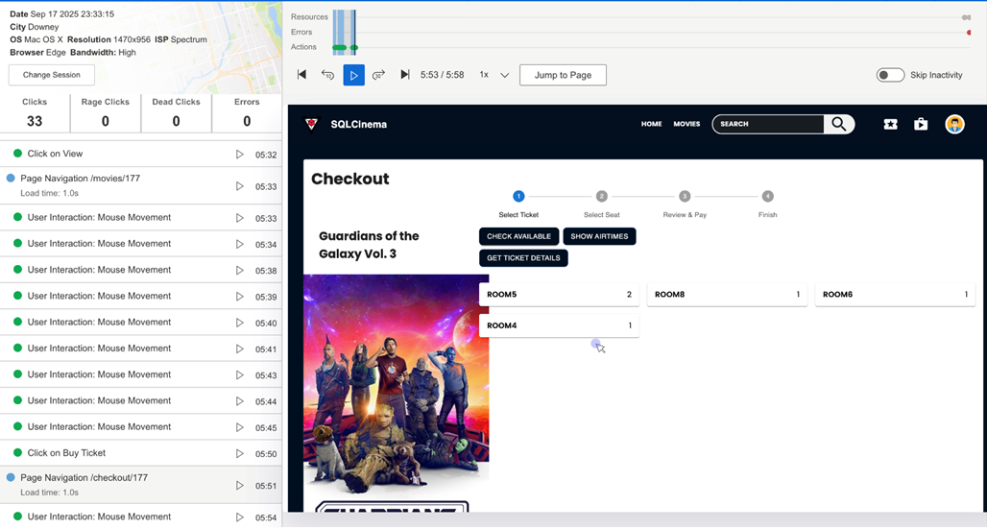
Catchpoint’s Session Replay

Session replay is a visual tool that recreates user sessions from your applications, giving you an in-depth, video-like view of how customers are actually interacting with your product. Unlike traditional analytics tools that provide quantitative data like click counts and bounce rates, session replay enriches this information with the qualitative context needed to understand exactly what users experienced during their sessions.  

At its core, session replay works by capturing Document Object Model (DOM) mutations and transforming them into reproductions of user sessions. The DOM is an interface that translates web document elements into objects that programs can manipulate. Session replay logs every change made to the DOM as an event, then strings these events together into a representation of each user's individual session.  

Session replay captures a comprehensive range of user interactions, including:  

  • Every click, scroll, input, and DOM change
  • Mouse movements and cursor positions
  • Form entries and field interactions
  • Page loads and navigation patterns
  • User interface changes and dynamic content updates

What Session Replay isn't

It's important to understand what session replay is not to address common misconceptions:  

Not a video recording: It doesn't record users' screens like a traditional video or screen recording tool. Instead, it reconstructs the user experience using captured DOM events and mutations.  

Not real-time monitoring: You're not seeing events as they happen live, but rather watching a playback of recorded interactions.  

Not comprehensive screen capture: Session replay focuses specifically on user actions within your application, unlike screen recording which captures everything on a user's screen including system notifications or background processes.  

Not a replacement for other tools: Session replay serves as a complementary feature to gain deeper insights into user behavior and application performance, working best when combined with other monitoring solutions.  

How Session Replay works

Session replay operates through a sophisticated process of event capture and reconstruction:  

Data capture process

The technology uses a recording script installed on each page to capture several key elements:  

  • Initial DOM state: The webpage structure as it first loads
  • DOM mutations: Changes that occur on the webpage over time
  • User events: Interactions like mouse movements, clicks, scrolls, and keyboard inputs
  • Custom events: Specific interactions that might not be captured by standard JavaScript events
  • Metadata: Browser information, screen resolution, timestamps, and other contextual data

Reconstruction and playback

When you view a session replay, the tool reverses this capture process. It loads the initial DOM from the recorded session, then applies all the captured mutations and events in chronological order to recreate the user's exact experience. This approach allows for several advantages over traditional video recording:  

  • Smaller file sizes and reduced bandwidth requirements
  • Ability to inspect HTML elements during playback
  • Privacy controls to mask sensitive information
  • Enhanced playback controls like fast-forward, rewind, and skip-to-moment functionality

What Does Session Replay log?

Session replay captures an extensive range of user interactions and system events:

User interactions

  • Mouse movements: Complete cursor paths and positioning data
  • Click events: Every click with precise element targeting
  • Keyboard inputs: Text entries in forms and input fields (with privacy controls)
  • Scroll behavior: Vertical and horizontal scrolling patterns
  • Touch interactions: For mobile web experiences, including taps, swipes, and gestures

Technical events

  • DOM modifications: Dynamic content changes and updates
  • Page loads: Navigation between pages and single-page app transitions
  • Form interactions: Field focus, completion, and submission patterns
  • JavaScript events: Custom application events and state changes
  • Network requests: Associated with user actions (when integrated with performance tools)

Contextual information

  • Timestamps: Precise timing for every captured event
  • Session metadata: Browser type, device information, screen resolution
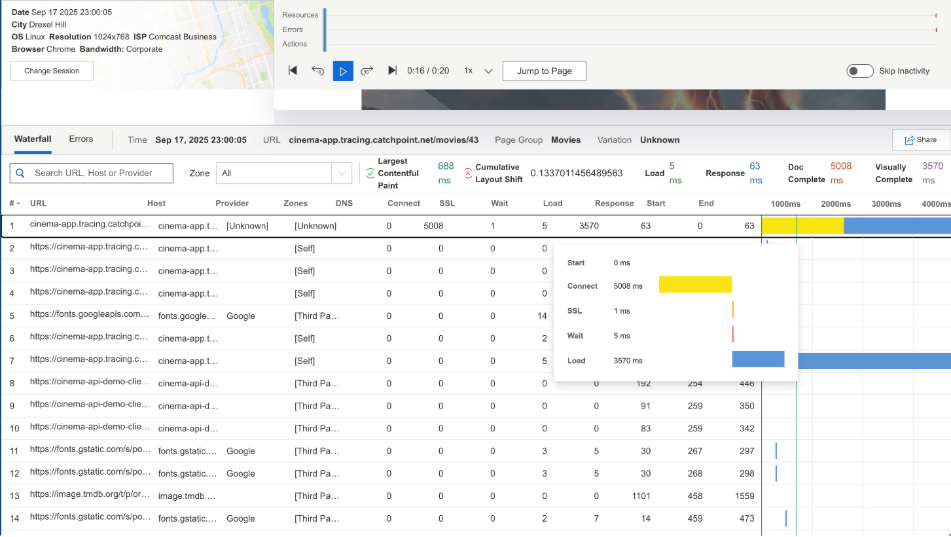
  • Performance data: When integrated with tools like Catchpoint's waterfall analysis
A screenshot of a computerAI-generated content may be incorrect.

What is Session Replay useful for?

Session replay provides value across multiple dimensions of digital experience optimization:  

  1. Debugging and troubleshooting

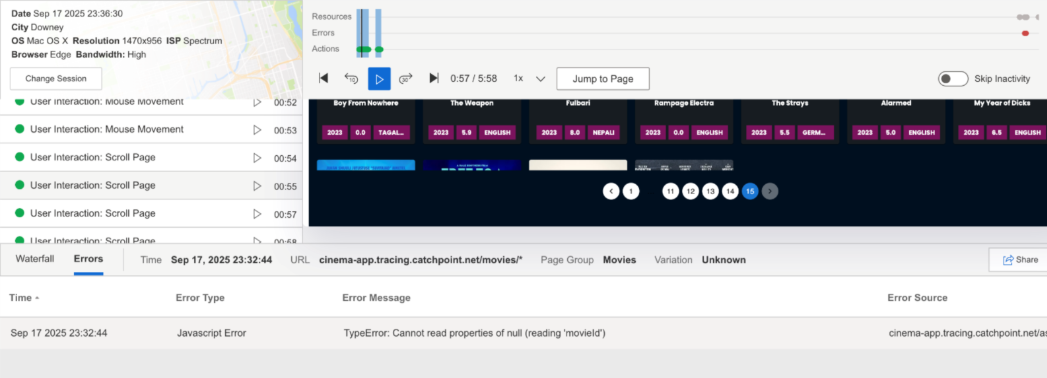
Session Replay dramatically improves mean-time-to-repair (MTTR) by allowing developers to reproduce errors without guesswork. Instead of relying on user descriptions or attempting to recreate issues, teams can watch exactly what happened leading up to an error, including the precise steps and conditions that triggered the problem.  

  1. User Experience Optimization

Teams can identify friction points in user journeys by observing real user behavior patterns. This includes spotting elements that actively drive users away, such as intrusive pop-ups or hard-to-navigate menus, as well as understanding which features prompt users to convert.  

  1. Customer Support Enhancement

Support agents can resolve user-reported issues more quickly by viewing exactly what the customer experienced, eliminating the back-and-forth typically required to understand the problem. This leads to improved customer satisfaction and reduced support ticket resolution times.  

  1. Conversion Rate Optimization

Product managers and marketers can analyze complete user journeys to understand where users lose interest or encounter obstacles in conversion flows. Session replay helps identify successful user patterns that can be replicated and promoted.

Session Replay use cases and who it's for
A screenshot of a computerAI-generated content may be incorrect.

Developers and site reliability engineers

  • Reproducing front-end bugs and performance issues
  • Understanding the exact sequence of events leading to errors
  • Validating fixes by observing user behavior before and after changes
  • Debugging complex JavaScript applications and single-page applications

Key benefits: Faster bug resolution, reduced guesswork in troubleshooting, and clearer understanding of how code changes affect user experience.  

Customer support teams

  • Resolving customer complaints with visual evidence
  • Understanding user-reported issues without lengthy explanations
  • Providing more accurate and faster support responses
  • Training new support staff with real user interaction examples

Key benefits: Improved customer satisfaction, reduced resolution times, and more accurate problem diagnosis.  

Product managers and UX teams

  • Analyzing user behavior patterns and journey optimization
  • Identifying usability issues and design pain points
  • Understanding feature adoption and usage patterns
  • Making data-driven decisions about product improvements

Key benefits: Better user experience design, improved conversion rates, and evidence-based product decisions.  

QA and testing teams

  • Validating that applications work as expected in real-world conditions
  • Identifying edge cases and unexpected user behaviors
  • Complementing automated testing with real user interaction data
  • Understanding how performance issues manifest in actual usage

Marketing and Conversion Teams

  • Optimizing landing pages and conversion funnels
  • Understanding campaign effectiveness and user engagement
  • Identifying barriers to conversion and checkout abandonment
  • A/B testing validation with real user behavior data

What makes Catchpoint Session Replay different

Catchpoint's Session Replay stands out in several key areas that align with our comprehensive Internet Performance Monitoring approach:

  1. Native IPM platform integration

Unlike fragmented solutions that require multiple tools, Catchpoint delivers session replay natively within our IPM platform alongside Real User Monitoring (RUM), advanced synthetics, BGP monitoring, and distributed tracing. Combined with insights from our 3000+ Global Agent Network, this provides a single consolidated solution for end-to-end digital experience management, eliminating tool sprawl and operational complexity.  

  1. Waterfall correlation for rich context

Catchpoint's unique advantage lies in correlating session replays directly with performance waterfalls, network timings, and resource loading data. This context-rich debugging approach allows teams to see not just what users did, but how performance and network conditions affected their experience.

  1. Real user monitoring synergy

Session Replay integrates seamlessly with Catchpoint's RUM capabilities, which already monitor real user experiences from various devices and network conditions. This combination provides both the quantitative performance data and qualitative behavioral insights needed for comprehensive experience optimization.  

  1. Frustration signal detection

Catchpoint's Session Replay automatically detects and highlights frustration signals including rage clicks, dead clicks, quick backs, and bounces. This proactive identification of user pain points helps teams prioritize issues that most significantly impact user satisfaction and business outcomes.

  1. Enterprise-grade privacy and security

Built with privacy-first design, Catchpoint's Session Replay includes sensitive data masking to ensure compliance and security. The platform offers flexible deployment options with per-app enablement and smart sampling, allowing organizations to balance insight gathering with data governance requirements.

  1. WebPageTest Expert integration

Session Replay is available as an add-on to the WebPageTest Expert Plan, giving teams advanced visibility and real user context within their performance workflows. Teams already using WebPageTest can now correlate their test results with real user session data for a complete performance picture.  

The combination of these differentiators positions Catchpoint's Session Replay as more than just a user behavior recording tool. It's an integral component of a comprehensive IPM strategy that helps organizations protect user trust, improve conversion rates, and maintain competitive digital experiences in an increasingly complex internet ecosystem.

Putting Session Replay into practice

Session Replay is most effective when used as part of a broader performance and experience workflow. By viewing session replays alongside synthetic tests, Real User Monitoring (RUM), and performance analytics, teams can move from knowing something went wrong to understanding exactly why it happened.

Used consistently, Session Replay helps teams shorten troubleshooting cycles, uncover hidden UX friction, and validate improvements with real user behavior. Rather than reacting to metrics in isolation, organizations gain the context needed to prevent issues before they impact customers, conversions, and brand trust.

Dig deeper

Summary

  • See exactly how users experience your site or app with Session Replayfrom every click and scroll to the moments where journeys break down.
  • Turn confusing rage-clicks, drop-offs, and support tickets into clear, visual stories your SRE, dev, product, and CX teams can actually act on.
  • Learn how to choose, implement, and get real business value from Session Replay so you can fix issues faster, protect revenue, and continually improve digital experiences.

In digital experience, the difference between a conversion and a bounce often comes down to a split-second moment of frustration. But metrics alone can’t always tell you why a user left.

Session Replay transforms how teams understand, diagnose, and optimize digital experiences. It helps you move beyond simple error logging to prevent churn, recover lost revenue, and boost customer satisfaction by identifying exactly where friction occurs.

In this guide, we will explore:

  • How Session Replay works.
  • The difference between Replay and standard analytics.
  • Real-world use cases for SREs, Developers, and Product owners.

What is Session Replay?

Catchpoint’s Session Replay

Session replay is a visual tool that recreates user sessions from your applications, giving you an in-depth, video-like view of how customers are actually interacting with your product. Unlike traditional analytics tools that provide quantitative data like click counts and bounce rates, session replay enriches this information with the qualitative context needed to understand exactly what users experienced during their sessions.  

At its core, session replay works by capturing Document Object Model (DOM) mutations and transforming them into reproductions of user sessions. The DOM is an interface that translates web document elements into objects that programs can manipulate. Session replay logs every change made to the DOM as an event, then strings these events together into a representation of each user's individual session.  

Session replay captures a comprehensive range of user interactions, including:  

  • Every click, scroll, input, and DOM change
  • Mouse movements and cursor positions
  • Form entries and field interactions
  • Page loads and navigation patterns
  • User interface changes and dynamic content updates

What Session Replay isn't

It's important to understand what session replay is not to address common misconceptions:  

Not a video recording: It doesn't record users' screens like a traditional video or screen recording tool. Instead, it reconstructs the user experience using captured DOM events and mutations.  

Not real-time monitoring: You're not seeing events as they happen live, but rather watching a playback of recorded interactions.  

Not comprehensive screen capture: Session replay focuses specifically on user actions within your application, unlike screen recording which captures everything on a user's screen including system notifications or background processes.  

Not a replacement for other tools: Session replay serves as a complementary feature to gain deeper insights into user behavior and application performance, working best when combined with other monitoring solutions.  

How Session Replay works

Session replay operates through a sophisticated process of event capture and reconstruction:  

Data capture process

The technology uses a recording script installed on each page to capture several key elements:  

  • Initial DOM state: The webpage structure as it first loads
  • DOM mutations: Changes that occur on the webpage over time
  • User events: Interactions like mouse movements, clicks, scrolls, and keyboard inputs
  • Custom events: Specific interactions that might not be captured by standard JavaScript events
  • Metadata: Browser information, screen resolution, timestamps, and other contextual data

Reconstruction and playback

When you view a session replay, the tool reverses this capture process. It loads the initial DOM from the recorded session, then applies all the captured mutations and events in chronological order to recreate the user's exact experience. This approach allows for several advantages over traditional video recording:  

  • Smaller file sizes and reduced bandwidth requirements
  • Ability to inspect HTML elements during playback
  • Privacy controls to mask sensitive information
  • Enhanced playback controls like fast-forward, rewind, and skip-to-moment functionality

What Does Session Replay log?

Session replay captures an extensive range of user interactions and system events:

User interactions

  • Mouse movements: Complete cursor paths and positioning data
  • Click events: Every click with precise element targeting
  • Keyboard inputs: Text entries in forms and input fields (with privacy controls)
  • Scroll behavior: Vertical and horizontal scrolling patterns
  • Touch interactions: For mobile web experiences, including taps, swipes, and gestures

Technical events

  • DOM modifications: Dynamic content changes and updates
  • Page loads: Navigation between pages and single-page app transitions
  • Form interactions: Field focus, completion, and submission patterns
  • JavaScript events: Custom application events and state changes
  • Network requests: Associated with user actions (when integrated with performance tools)

Contextual information

  • Timestamps: Precise timing for every captured event
  • Session metadata: Browser type, device information, screen resolution
  • Performance data: When integrated with tools like Catchpoint's waterfall analysis
A screenshot of a computerAI-generated content may be incorrect.

What is Session Replay useful for?

Session replay provides value across multiple dimensions of digital experience optimization:  

  1. Debugging and troubleshooting

Session Replay dramatically improves mean-time-to-repair (MTTR) by allowing developers to reproduce errors without guesswork. Instead of relying on user descriptions or attempting to recreate issues, teams can watch exactly what happened leading up to an error, including the precise steps and conditions that triggered the problem.  

  1. User Experience Optimization

Teams can identify friction points in user journeys by observing real user behavior patterns. This includes spotting elements that actively drive users away, such as intrusive pop-ups or hard-to-navigate menus, as well as understanding which features prompt users to convert.  

  1. Customer Support Enhancement

Support agents can resolve user-reported issues more quickly by viewing exactly what the customer experienced, eliminating the back-and-forth typically required to understand the problem. This leads to improved customer satisfaction and reduced support ticket resolution times.  

  1. Conversion Rate Optimization

Product managers and marketers can analyze complete user journeys to understand where users lose interest or encounter obstacles in conversion flows. Session replay helps identify successful user patterns that can be replicated and promoted.

Session Replay use cases and who it's for

A screenshot of a computerAI-generated content may be incorrect.

Developers and site reliability engineers

  • Reproducing front-end bugs and performance issues
  • Understanding the exact sequence of events leading to errors
  • Validating fixes by observing user behavior before and after changes
  • Debugging complex JavaScript applications and single-page applications

Key benefits: Faster bug resolution, reduced guesswork in troubleshooting, and clearer understanding of how code changes affect user experience.  

Customer support teams

  • Resolving customer complaints with visual evidence
  • Understanding user-reported issues without lengthy explanations
  • Providing more accurate and faster support responses
  • Training new support staff with real user interaction examples

Key benefits: Improved customer satisfaction, reduced resolution times, and more accurate problem diagnosis.  

Product managers and UX teams

  • Analyzing user behavior patterns and journey optimization
  • Identifying usability issues and design pain points
  • Understanding feature adoption and usage patterns
  • Making data-driven decisions about product improvements

Key benefits: Better user experience design, improved conversion rates, and evidence-based product decisions.  

QA and testing teams

  • Validating that applications work as expected in real-world conditions
  • Identifying edge cases and unexpected user behaviors
  • Complementing automated testing with real user interaction data
  • Understanding how performance issues manifest in actual usage

Marketing and Conversion Teams

  • Optimizing landing pages and conversion funnels
  • Understanding campaign effectiveness and user engagement
  • Identifying barriers to conversion and checkout abandonment
  • A/B testing validation with real user behavior data

What makes Catchpoint Session Replay different

Catchpoint's Session Replay stands out in several key areas that align with our comprehensive Internet Performance Monitoring approach:

  1. Native IPM platform integration

Unlike fragmented solutions that require multiple tools, Catchpoint delivers session replay natively within our IPM platform alongside Real User Monitoring (RUM), advanced synthetics, BGP monitoring, and distributed tracing. Combined with insights from our 3000+ Global Agent Network, this provides a single consolidated solution for end-to-end digital experience management, eliminating tool sprawl and operational complexity.  

  1. Waterfall correlation for rich context

Catchpoint's unique advantage lies in correlating session replays directly with performance waterfalls, network timings, and resource loading data. This context-rich debugging approach allows teams to see not just what users did, but how performance and network conditions affected their experience.

  1. Real user monitoring synergy

Session Replay integrates seamlessly with Catchpoint's RUM capabilities, which already monitor real user experiences from various devices and network conditions. This combination provides both the quantitative performance data and qualitative behavioral insights needed for comprehensive experience optimization.  

  1. Frustration signal detection

Catchpoint's Session Replay automatically detects and highlights frustration signals including rage clicks, dead clicks, quick backs, and bounces. This proactive identification of user pain points helps teams prioritize issues that most significantly impact user satisfaction and business outcomes.

  1. Enterprise-grade privacy and security

Built with privacy-first design, Catchpoint's Session Replay includes sensitive data masking to ensure compliance and security. The platform offers flexible deployment options with per-app enablement and smart sampling, allowing organizations to balance insight gathering with data governance requirements.

  1. WebPageTest Expert integration

Session Replay is available as an add-on to the WebPageTest Expert Plan, giving teams advanced visibility and real user context within their performance workflows. Teams already using WebPageTest can now correlate their test results with real user session data for a complete performance picture.  

The combination of these differentiators positions Catchpoint's Session Replay as more than just a user behavior recording tool. It's an integral component of a comprehensive IPM strategy that helps organizations protect user trust, improve conversion rates, and maintain competitive digital experiences in an increasingly complex internet ecosystem.

Putting Session Replay into practice

Session Replay is most effective when used as part of a broader performance and experience workflow. By viewing session replays alongside synthetic tests, Real User Monitoring (RUM), and performance analytics, teams can move from knowing something went wrong to understanding exactly why it happened.

Used consistently, Session Replay helps teams shorten troubleshooting cycles, uncover hidden UX friction, and validate improvements with real user behavior. Rather than reacting to metrics in isolation, organizations gain the context needed to prevent issues before they impact customers, conversions, and brand trust.

Dig deeper

This is some text inside of a div block.

You might also like

Blog post

The next evolution of WebPageTest has arrived, and it’s a game-changer

Blog post

The Next Chapter of WebPageTest: Your New Experience Starts Soon

Blog post

Session Replay explained: A guide to seeing digital experience through your user’s eyes